Artificial intelligence has transformed the way individuals and businesses organize their work. Traditional task management apps simply stored to-do lists and reminders, but today’s AI-powered task managers go much further.
They automatically prioritize tasks, schedule your day, summarize meetings, generate project updates, predict deadlines, and even help teams collaborate more efficiently.
Whether you’re a freelancer juggling multiple clients, a student managing assignments, or a business leader coordinating a large team, the right AI task manager can significantly improve productivity while reducing manual planning.
In this guide, we’ll explore the 8 best AI task managers in 2026, comparing their features, pricing, strengths, and ideal use cases to help you choose the perfect productivity solution.
Quick Comparison Table
| AI Task Manager | Best For | AI Features | Free Plan |
| Motion | Automatic scheduling | AI calendar & planning | Trial only |
| ClickUp AI | Teams & businesses | AI writing, task creation | Yes |
| Notion AI | Documentation & planning | AI notes & summaries | Yes |
| Asana Intelligence | Enterprise teams | Smart workflows | Limited |
| Todoist AI | Personal productivity | AI task suggestions | Yes |
| Trello AI | Visual project management | AI automation | Yes |
| Monday.com AI | Large organizations | AI workflows | Trial |
| Taskade AI | Remote collaboration | AI agents & mind maps | Yes |
Why Use an AI Task Manager?
Managing dozens—or even hundreds—of daily tasks manually is time-consuming. AI task managers reduce repetitive work by intelligently organizing your schedule and helping you focus on high-priority activities.
Some of the biggest advantages include:
- Automatic task prioritization
- Smart deadline predictions
- AI-generated project summaries
- Meeting note organization
- Natural language task creation
- Intelligent reminders
- Workflow automation
- Team productivity insights
Instead of spending time planning your work, AI helps you spend more time actually completing it.
1. Motion
Overview
Motion has become one of the most advanced AI scheduling platforms available in 2026. Instead of requiring users to manually plan every hour, Motion analyzes deadlines, meetings, priorities, and workload to automatically create an optimized daily schedule.
Whenever a new task appears, Motion reorganizes your calendar without requiring manual adjustments.
This makes it particularly useful for entrepreneurs, consultants, executives, and busy professionals.
Key Features
- AI calendar planning
- Automatic task prioritization
- Meeting scheduling
- Project management
- Deadline optimization
- Focus time blocking
- Team collaboration
- Smart workload balancing
Pros
- Saves hours of weekly planning
- Excellent calendar automation
- Beautiful interface
- Smart scheduling engine
- Great for busy professionals
Cons
- Premium pricing
- Learning curve for new users
- Best experience requires calendar integration
Pricing
- Free Trial
- Individual Plan
- Business Plan
Best For
Professionals who want an AI assistant to automatically organize every workday.
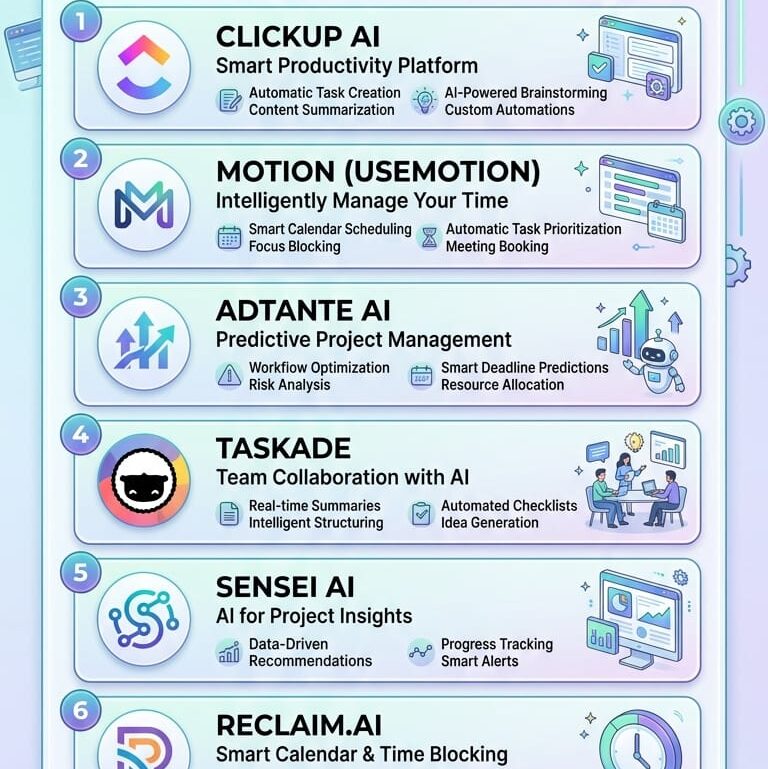
2. ClickUp AI
Overview
ClickUp has evolved into one of the most comprehensive productivity platforms available. Its AI assistant helps teams generate documents, create task lists, summarize discussions, draft emails, and automate repetitive workflows.
Rather than switching between multiple productivity apps, ClickUp combines project management, documentation, chat, dashboards, and AI in one platform.
For startups and growing businesses, this all-in-one approach can reduce software costs while improving collaboration.
Key Features
- AI writing assistant
- Automatic task creation
- Meeting summaries
- Document generation
- Workflow automation
- Goal tracking
- Time tracking
- Team dashboards
Pros
- Extremely feature-rich
- Excellent collaboration tools
- Strong automation
- Generous free plan
- Highly customizable
Cons
- Can feel overwhelming initially
- Advanced features require paid plans
Pricing
- Free
- Unlimited
- Business
- Enterprise
Best For
Companies needing an all-in-one productivity and project management solution.
3. Notion AI
Overview
Notion has grown from a simple note-taking application into one of the world’s most versatile productivity platforms. In 2026, Notion AI helps users brainstorm ideas, summarize documents, organize projects, answer questions from internal knowledge bases, and create structured content in seconds.
Unlike traditional task managers, Notion excels at combining notes, databases, project planning, documentation, and AI assistance in one workspace.
This flexibility makes it especially popular among students, creators, startups, and remote teams.
Key Features
- AI writing
- Knowledge management
- Smart search
- Project databases
- Task management
- Meeting summaries
- Content generation
- Document translation
Pros
- Extremely flexible
- Beautiful interface
- Excellent documentation
- Strong AI writing
- Powerful databases
Cons
- Requires setup time
- Not ideal for users wanting simple task lists
Pricing
- Free
- Plus
- Business
- Enterprise
Best For
Users who want one workspace for notes, projects, documents, and AI-powered productivity.
4. Asana Intelligence
Overview
Asana has introduced AI-powered capabilities that make managing large projects much easier. Its intelligent features can identify bottlenecks, recommend priorities, generate project summaries, and automate routine project updates.
Managers can quickly understand project status without reading every conversation, while team members benefit from automated workflows that reduce repetitive administrative work.
Asana is particularly effective for medium-sized and enterprise organizations handling complex projects across multiple departments.
Key Features
- AI project summaries
- Smart status updates
- Workflow automation
- Resource planning
- Timeline management
- Goal tracking
- Team collaboration
- Portfolio management
Pros
- Excellent enterprise features
- Strong reporting
- Reliable automation
- Easy collaboration
- Powerful project tracking
Cons
- Premium features can be expensive
- Less suitable for individual users
Pricing
- Personal
- Starter
- Advanced
- Enterprise
Best For
Large teams managing complex, cross-functional projects.
Which One Is Best So Far?
After comparing the first four tools, here’s a quick recommendation:
- Best Overall: Motion
- Best for Businesses: ClickUp AI
- Best for Knowledge Management: Notion AI
- Best for Enterprise Project Management: Asana Intelligence
Each platform has unique strengths, so the right choice depends on your workflow, team size, and productivity goals.
In the next section, we’ll cover four more leading AI task managers—Todoist AI, Trello AI, Monday.com AI, and Taskade AI—along with a detailed buying guide to help you choose the best solution for your needs.
Since you’re asking for the continuation of the article, here’s Part 2 in the same SEO-friendly format.
5. Todoist AI
Overview
Todoist has long been one of the most popular personal productivity apps, and its AI-powered features make it even more effective in 2026. Instead of simply storing your tasks, Todoist AI understands natural language, recommends task priorities, suggests deadlines, and helps organize your workload based on urgency and importance.
Its clean interface and lightweight design make it ideal for users who want a powerful task manager without unnecessary complexity.
Key Features
- AI-powered task suggestions
- Natural language task creation
- Smart due date recommendations
- Priority management
- Productivity tracking
- Recurring tasks
- Cross-platform synchronization
- Team collaboration
Pros
- Extremely easy to use
- Fast performance
- Excellent mobile apps
- Strong free plan
- Minimal learning curve
Cons
- Limited project management features
- AI capabilities are less advanced than enterprise platforms
Pricing
- Free
- Pro
- Business
Best For
Individuals, freelancers, and students looking for a simple yet intelligent task manager.
6. Trello AI
Overview
Trello remains one of the easiest visual project management platforms, and its AI enhancements make Kanban boards even smarter. AI can automatically organize cards, summarize discussions, recommend automations, and generate project updates for teams.
Its intuitive drag-and-drop interface makes project tracking simple while reducing repetitive administrative work.
Key Features
- AI-generated card summaries
- Smart automation
- Kanban boards
- Workflow templates
- Due date management
- Team collaboration
- Power-Ups integration
- Project reporting
Pros
- Very easy to learn
- Excellent visual organization
- Flexible workflows
- Strong integrations
- Free plan available
Cons
- Limited advanced reporting
- Large projects may require additional customization
Pricing
- Free
- Standard
- Premium
- Enterprise
Best For
Creative teams and businesses that prefer visual project management.
7. Monday.com AI
Overview
Monday.com has expanded its platform with AI-powered workflow automation, helping organizations streamline operations across departments. AI can generate task descriptions, summarize updates, automate repetitive actions, and assist managers in tracking project progress.
Its highly customizable dashboards make it suitable for marketing, sales, HR, operations, and software development teams.
Key Features
- AI workflow automation
- Smart project summaries
- Dashboard analytics
- Resource management
- Time tracking
- Custom automations
- CRM integration
- Team collaboration
Pros
- Highly customizable
- Excellent reporting
- Strong enterprise capabilities
- Powerful automation
- User-friendly interface
Cons
- Higher pricing for advanced plans
- Can require setup for complex workflows
Pricing
- Free Trial
- Basic
- Standard
- Pro
- Enterprise
Best For
Large organizations needing customizable workflows and advanced automation.
8. Taskade AI
Overview
Taskade combines AI agents, task management, note-taking, mind mapping, and real-time collaboration into one modern workspace. Its AI assistant can generate task lists, brainstorm ideas, create project outlines, summarize documents, and automate repetitive workflows.
The platform is particularly attractive for remote teams, startups, and content creators looking for an all-in-one collaborative environment.
Key Features
- AI agents
- Mind maps
- Task management
- Project templates
- Document collaboration
- Workflow automation
- Video collaboration
- Real-time editing
Pros
- Innovative AI features
- Excellent collaboration tools
- Beautiful interface
- Flexible workspaces
- Generous free plan
Cons
- Smaller ecosystem than larger competitors
- Some advanced AI features require paid plans
Pricing
- Free
- Pro
- Business
- Ultimate
Best For
Remote teams, startups, and creators seeking AI-assisted collaboration.
Final Comparison
| Platform | Best For | Starting Price | AI Strength |
| Motion | Automatic scheduling | Trial | ⭐⭐⭐⭐⭐ |
| ClickUp AI | Businesses | Free | ⭐⭐⭐⭐⭐ |
| Notion AI | Documentation | Free | ⭐⭐⭐⭐⭐ |
| Asana Intelligence | Enterprise | Limited Free | ⭐⭐⭐⭐☆ |
| Todoist AI | Personal productivity | Free | ⭐⭐⭐⭐☆ |
| Trello AI | Visual workflows | Free | ⭐⭐⭐⭐☆ |
| Monday.com AI | Enterprise workflows | Trial | ⭐⭐⭐⭐⭐ |
| Taskade AI | Remote teams | Free | ⭐⭐⭐⭐☆ |
Buying Guide: How to Choose the Best AI Task Manager
When selecting an AI task manager, consider the following factors:
1. Team Size
- Individuals may prefer Todoist AI or Motion.
- Small businesses can benefit from ClickUp AI or Notion AI.
- Large enterprises often require Asana Intelligence or Monday.com AI.
2. Automation Features
Look for AI capabilities such as:
- Automatic scheduling
- Workflow automation
- Task prioritization
- Meeting summaries
- Deadline predictions
3. Collaboration
If you work with a team, choose a platform that supports:
- Real-time editing
- File sharing
- Comments
- Project dashboards
- Team communication
4. Integrations
Ensure the platform connects with tools you already use, such as:
- Google Calendar
- Microsoft Outlook
- Slack
- Zoom
- Google Drive
- Dropbox
5. Budget
Many AI task managers offer generous free plans, while premium subscriptions unlock advanced AI automation, analytics, and collaboration features.
Frequently Asked Questions (FAQs)
Which AI task manager is best overall?
Motion stands out for automatic scheduling and intelligent calendar management, while ClickUp AI offers the best all-in-one productivity platform for teams.
Are AI task managers worth it?
Yes. AI task managers can reduce manual planning, automate repetitive work, improve collaboration, and help users focus on high-priority tasks.
Which AI task manager is best for students?
Notion AI and Todoist AI are excellent choices for students due to their flexibility, note-taking capabilities, and affordable pricing.
Can AI automatically prioritize tasks?
Most modern AI task managers analyze deadlines, workload, and urgency to recommend or automatically prioritize tasks.
Do AI task managers integrate with calendars?
Yes. Most leading platforms integrate with Google Calendar, Microsoft Outlook, Apple Calendar, and other scheduling tools.
Conclusion
AI task managers have evolved far beyond simple to-do lists. They now serve as intelligent productivity assistants that can organize schedules, automate workflows, summarize meetings, and help individuals and teams accomplish more with less effort.
If your primary goal is automatic scheduling, Motion is an excellent choice. For businesses needing a complete productivity ecosystem, ClickUp AI delivers exceptional value.
Notion AI excels in documentation and knowledge management, while Asana Intelligence and Monday.com AI are well suited for enterprise project management. Todoist AI, Trello AI, and Taskade AI round out the list with strong options for personal productivity, visual workflows, and remote collaboration.
Choosing the right AI task manager ultimately depends on your workflow, team size, and productivity goals. By selecting a platform that aligns with your needs, you can streamline your work, stay organized, and make the most of AI-powered productivity in 2026.