7 Best AI Calendar Assistants in 2026
Managing time effectively has become more challenging than ever. Professionals, entrepreneurs, students, and remote teams often struggle with packed schedules, overlapping meetings, missed deadlines, and endless calendar management tasks.
Fortunately, artificial intelligence has transformed the way we organize our daily lives.
AI calendar assistants are no longer simple scheduling tools. In 2026, these platforms can automatically book meetings, find the best times for appointments, reschedule conflicts, prioritize tasks, send reminders, and even learn your work habits to optimize productivity.
Whether you’re a busy executive, freelancer, content creator, or student, an AI-powered calendar assistant can save hours every week while reducing scheduling stress.
In this guide, we’ll explore the 7 best AI calendar assistants in 2026, their features, advantages, disadvantages, and who they are best suited for.
What Is an AI Calendar Assistant?
An AI calendar assistant is software that uses artificial intelligence to automate scheduling and time management tasks.
Unlike traditional calendars, AI-powered assistants can:
- Schedule meetings automatically
- Resolve calendar conflicts
- Recommend optimal meeting times
- Send reminders
- Prioritize important tasks
- Analyze productivity patterns
- Integrate with email and communication platforms
- Reschedule events when priorities change
These tools help users spend less time organizing schedules and more time focusing on meaningful work.
Why Use an AI Calendar Assistant?
Here are some key benefits:
- Time Savings
- Manual scheduling consumes valuable time. AI assistants automate the process.
- Reduced Scheduling Conflicts
- AI detects overlapping appointments and suggests alternatives.
- Better Productivity
- Smart scheduling ensures deep work sessions are protected.
- Improved Team Collaboration
- Teams can find available meeting times quickly.
- Automatic Reminders
- Missed meetings become less common.
- Personalized Scheduling
- The AI learns your habits and adjusts recommendations accordingly.
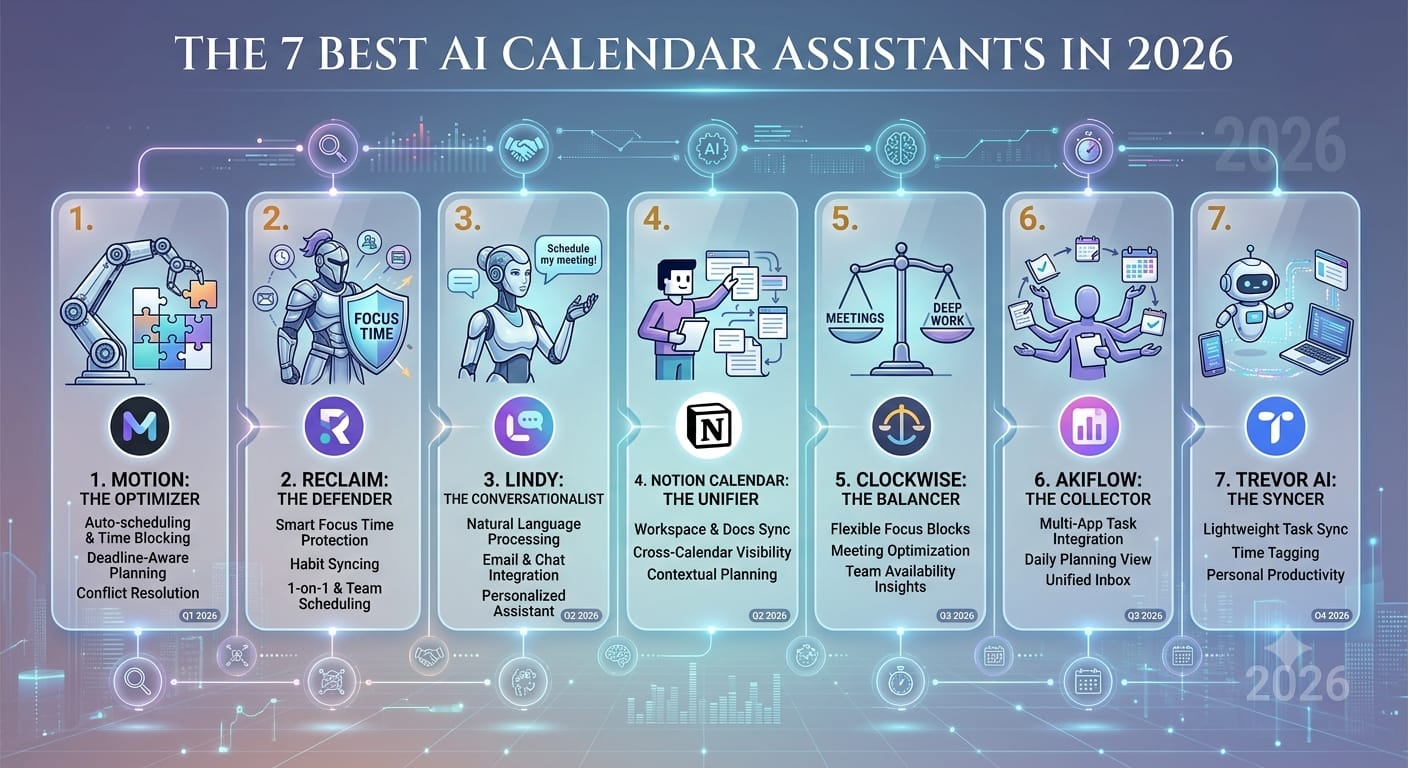
1. Motion
Overview
Motion remains one of the most powerful AI calendar assistants available in 2026. It combines scheduling, task management, project planning, and calendar optimization into one platform.
Motion automatically organizes your day based on priorities and deadlines. If a meeting gets canceled or a task takes longer than expected, Motion rearranges your schedule automatically.
Key Features
- AI-powered task scheduling
- Automatic calendar optimization
- Meeting scheduling assistant
- Project management tools
- Focus time protection
- Deadline tracking
- Team scheduling
Pros
- Extremely powerful automation
- Excellent for busy professionals
- Combines tasks and calendar management
- Great user interface
Cons
- Higher pricing than some competitors
- Learning curve for beginners
Best For
- Entrepreneurs
- Managers
- Productivity enthusiasts
- Remote teams
2. Reclaim AI
Overview
Reclaim AI is one of the most intelligent scheduling platforms for balancing work and personal life.
It automatically finds time for meetings, habits, routines, and focus work while protecting your productivity.
One standout feature is habit scheduling. Users can create recurring activities such as exercise, reading, writing, or learning, and Reclaim automatically places them into the calendar.
Key Features
- Smart meeting scheduling
- Habit tracking and planning
- Work-life balance optimization
- Automatic rescheduling
- Team calendar coordination
- Focus time blocking
Pros
- Excellent automation
- Strong work-life balance features
- Flexible scheduling rules
- Good Google Calendar integration
Cons
- Best experience requires premium plan
- Limited customization for some workflows
Best For
- Freelancers
- Students
- Remote workers
- Professionals managing multiple priorities
3. Clockwise
Overview
Clockwise focuses on maximizing productivity through intelligent scheduling.
The platform automatically rearranges meetings to create larger blocks of uninterrupted focus time. This helps users complete important tasks without constant interruptions.
Clockwise is particularly popular among technology companies and remote teams.
Key Features
- Focus time optimization
- Smart meeting rescheduling
- Team scheduling
- Slack integration
- Flexible meeting management
- Productivity analytics
Pros
- Excellent for deep work
- Great team coordination
- Strong automation capabilities
- Easy to use
Cons
- More team-focused than individual-focused
- Advanced features require paid plans
Best For
- Software teams
- Remote organizations
- Knowledge workers
- Managers
4. Calendly AI
Overview
Calendly has evolved from a simple scheduling platform into an AI-powered appointment management system.
In 2026, Calendly uses artificial intelligence to automate booking processes, optimize availability, and reduce scheduling friction.
It remains one of the easiest solutions for booking meetings with clients, customers, and team members.
Key Features
- AI scheduling assistant
- Meeting availability optimization
- Automated reminders
- Time-zone detection
- Payment integrations
- Workflow automation
Pros
- Extremely easy setup
- Widely recognized
- Great integrations
- Excellent customer scheduling experience
Cons
- Less advanced task management
- Focused mainly on meeting scheduling
Best For
- Consultants
- Coaches
- Agencies
- Sales professionals
5. Trevor AI
Overview
Trevor AI combines task management and calendar planning in a simple, intuitive interface.
The platform helps users schedule tasks directly into available calendar slots. Instead of maintaining separate task lists and calendars, Trevor AI merges both systems.
The AI continuously adjusts schedules based on changing priorities.
Key Features
- Task-to-calendar scheduling
- AI productivity planning
- Drag-and-drop scheduling
- Daily planning assistance
- Calendar integrations
- Priority management
Pros
- Easy to learn
- Excellent task scheduling
- Affordable pricing
- Clean design
Cons
- Fewer advanced features
- Limited enterprise capabilities
Best For
- Students
- Freelancers
- Solo professionals
- Small business owners
6. Scheduler AI
Overview
Scheduler AI acts as a virtual scheduling assistant capable of handling meeting arrangements through email and messaging platforms.
Instead of manually coordinating appointments, users simply instruct Scheduler AI to organize meetings.
The platform communicates with participants, identifies suitable times, and finalizes bookings automatically.
Key Features
- AI meeting coordination
- Email scheduling automation
- CRM integrations
- Automated follow-ups
- Team scheduling
- Lead management support
Pros
- Saves significant scheduling time
- Great automation
- Strong business integrations
- Useful for sales teams
Cons
- Business-focused
- Less useful for personal scheduling
Best For
- Sales professionals
- Customer success teams
- Agencies
- Business executives
7. Kronologic
Overview
Kronologic is an AI-driven scheduling platform designed to streamline meeting booking and revenue-generating conversations.
It excels at automatically scheduling meetings with prospects and customers without requiring extensive manual coordination.
Companies using Kronologic often report faster booking rates and reduced scheduling delays.
Key Features
- AI meeting booking
- Sales workflow automation
- Prospect scheduling
- Calendar management
- CRM connectivity
- Automated outreach support
Pros
- Excellent for sales teams
- Reduces administrative work
- Strong automation
- Improves booking rates
Cons
- Primarily business-oriented
- Not ideal for personal use
Best For
- B2B companies
- Sales teams
- Revenue operations
- Customer-facing organizations
Comparison Table
| Tool | Best For | AI Scheduling | Task Management | Team Features |
| Motion | Productivity Power Users | Excellent | Excellent | Excellent |
| Reclaim AI | Work-Life Balance | Excellent | Good | Good |
| Clockwise | Deep Work | Excellent | Limited | Excellent |
| Calendly AI | Meeting Scheduling | Very Good | Limited | Good |
| Trevor AI | Personal Productivity | Good | Excellent | Basic |
| Scheduler AI | Business Scheduling | Excellent | Limited | Excellent |
| Kronologic | Sales Teams | Excellent | Limited | Excellent |
How to Choose the Right AI Calendar Assistant
Before selecting a platform, consider the following factors.
Your Main Goal
Ask yourself:
- Do you need meeting scheduling?
- Task management?
- Team coordination?
- Sales automation?
Different tools specialize in different areas.
Integration Requirements
Ensure the platform supports:
- Google Calendar
- Microsoft Outlook
- Slack
- Zoom
- Microsoft Teams
- CRM systems
Budget
- Some platforms offer free plans, while others focus on premium features.
- Evaluate whether the productivity gains justify the subscription cost.
Team Size
- Individuals may prefer Trevor AI or Reclaim AI, while larger organizations often benefit from Motion, Clockwise, or Kronologic.
Future of AI Calendar Assistants
The future looks promising.
By the end of 2026 and beyond, AI calendar assistants are expected to:
- Predict scheduling needs before users request them
- Analyze energy levels throughout the day
- Schedule tasks based on productivity patterns
- Integrate more deeply with AI workplace assistants
- Handle complete meeting lifecycles automatically
- Provide personalized productivity coaching
As AI technology advances, calendar management will become increasingly autonomous.
FAQs
1. What is the best AI calendar assistant in 2026?
Motion is widely considered one of the best AI calendar assistants because it combines scheduling, task management, and productivity optimization.
2. Are AI calendar assistants free?
Many platforms offer free plans or trials, but advanced AI features typically require a paid subscription.
3. Can AI calendar assistants schedule meetings automatically?
Yes. Most modern AI assistants can find suitable times, send invitations, and manage scheduling conflicts automatically.
4. Do AI calendar assistants work with Google Calendar?
Yes. Nearly all leading AI calendar tools integrate with Google Calendar.
5. Can these tools work with Microsoft Outlook?
Most major platforms support Outlook and Microsoft 365 integrations.
6. Are AI calendar assistants safe to use?
Reputable providers use encryption and security measures to protect user data and calendar information.
7. Which AI calendar assistant is best for students?
Trevor AI and Reclaim AI are excellent choices for students because they help balance classes, assignments, and personal activities.
8. Can AI assistants improve productivity?
Yes. They reduce scheduling overhead, protect focus time, and automate repetitive calendar management tasks.
9. Which tool is best for teams?
Clockwise and Motion are among the best options for team scheduling and collaboration.
10. Will AI completely manage calendars in the future?
AI is becoming increasingly capable of autonomous scheduling, and future systems may manage most calendar tasks with minimal user involvement.
Final Thoughts
AI calendar assistants have evolved into powerful productivity partners that do far more than schedule appointments. They help users optimize time, protect focus, improve collaboration, and reduce administrative work.
For most professionals in 2026, Motion stands out as the best all-around AI calendar assistant due to its advanced automation and task management capabilities. Reclaim AI excels at balancing work and personal routines, while Clockwise is ideal for teams seeking uninterrupted focus time. Calendly AI remains a top choice for effortless meeting scheduling, and Trevor AI offers a simple yet effective productivity solution.
Businesses focused on sales and customer interactions may find Scheduler AI and Kronologic especially valuable for automating appointment coordination and increasing efficiency.
Choosing the right AI calendar assistant ultimately depends on your workflow, goals, and scheduling needs. With the right tool, you can reclaim hours every week and focus on what matters most.